
How to: Setup POP Mail in Outlook 2013
We all have email and sometimes it’s hard to know how to set it up. What follows is a basic tutorial on how to setup your email using Post Office Protocol 3 (POP) on Outlook 2013.
POP is useful for its simplicity. Mail is downloaded from the server onto your device and deleted off the server. This is useful if you have limited storage available on your server and/or you are limited bandwidth as the synchronization process of other protocols can be bandwidth intensive.
To add your account to Outlook:
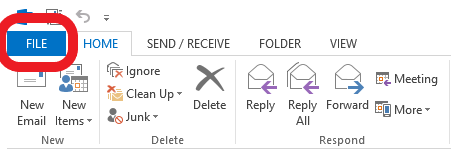
Click File
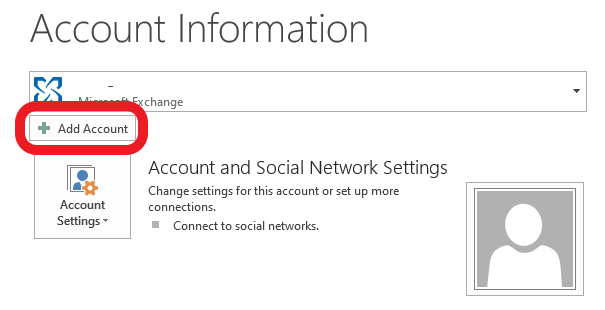
Add Account
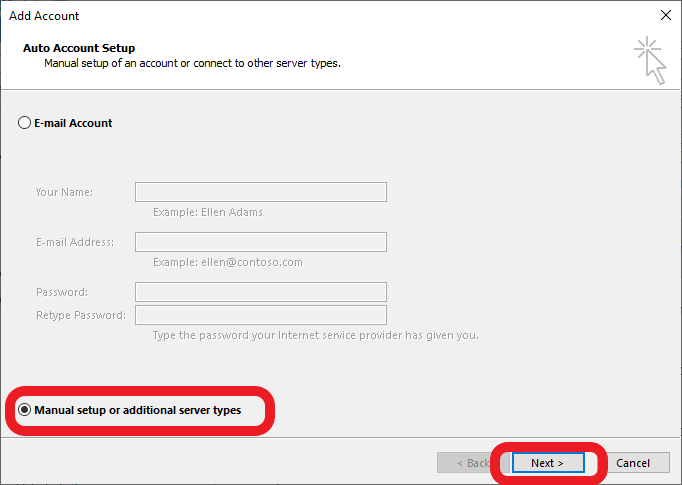
Select Manual Setup and then click Next

- Enter your account information as supplied to you by your ISP.
- Choose your where you want your mail to be delivered. If you are not sure, leave this on New Outlook Data File.
- Then click More Settings
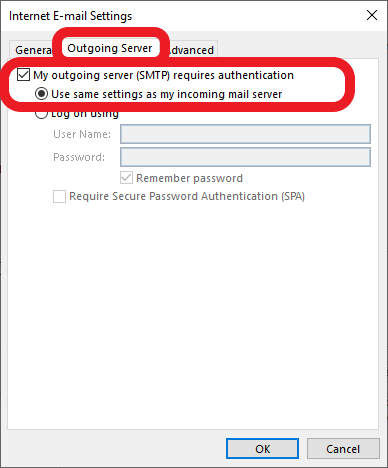
Select Outgoing Server, tick the box labeled My outgoing server (SMTP) requires authentication and leave the radio button on Use same settings as my incoming mail server.

- Select Advanced,
- then tick the box This server requires an encrypted connection (SSL).
- Under Outgoing server (SMTP) Select SSL from the drop down box the change the port to 587.
Next set the Outgoing Server (SMTP) to SSL, THEN change the port to 587. If you do this the other way round it will revert to the default port.

Click Next to finish. Outlook will test the connection and ensure that it has access before completing.

If you get all ticks then your account is setup correctly.
Click Close and we are done!
